Employing an Amazon virtual assistant is like taking a chance on something. You are opening your business up to someone you don’t know. The seller account contains all your money, all your stock, and all your reputation. This thought scares off many sellers.
That hesitation is healthy. It means you understand the stakes. But it should not stop you from getting help. The solution is a structured onboarding process. You share enough for the VA to be productive without exposing yourself to unnecessary risk. Knowing what to share with an Amazon virtual assistant on day one makes all the difference.
Start With Limited Access
The first day should not include full account access. It should include enough for the VA to understand your business. Start with read-only permissions where possible. Let them see your listings, inventory levels, and account health without giving them the ability to make changes.
This builds trust gradually. You evaluate their competence. They learn your business. If something feels off, you can pause before any damage happens. Amazon Virtual assistant services should feel like a partnership, not a gamble.
What to Share on Day One
Some information is essential for the VA to do their job. Share this early.
Product List
Give them a clear list of your ASINs. Include variations, categories, and current status. This helps them understand your catalog.
Brand Guidelines
Share your brand voice, logo files, and any style guides. This ensures consistency in any content they create.
Standard Operating Procedures
If you have documented processes, share them. This helps the VA follow your systems instead of inventing their own.
Communication Preferences
Tell them how you like to communicate. Email? Slack? Weekly calls? Clear expectations prevent frustration.
Feeling Nervous About Handing Over Access?
The right VA will respect your boundaries.
What Not to Share on Day One
Some things should wait. You do not need to hand over everything immediately.
Bank Account Details
Never share financial credentials. Payment to the VA should happen through a secure platform, not direct bank access.
Password to Your Primary Email
Your email contains password reset links and sensitive business data. Keep this private initially.
Full Admin Permissions
Amazon allows different user permission levels. Start with limited access. Expand later once the VA proves reliable.
Personal Identification Documents
There is no reason a VA needs your passport or driver’s license. Be wary of anyone asking for this.
Amazon Seller Central Access for VA
Amazon Seller Central access for a VA should be set up carefully. Amazon lets you invite users with specific permissions. Use this feature. Do not share your main login credentials.
Create a separate user account for the VA. Assign permissions based on their role. Inventory management, listing editing, and report viewing are common. Payment and tax information should remain restricted. This protects your account. If the relationship ends, you simply remove their user access. No password changes needed. No risk of unauthorized entry.
Is It Safe to Give VA Amazon Access
Many sellers ask this question. Is it safe to give a VA Amazon access? The answer depends on your setup. With proper user permissions and a solid contract, the risk is minimal.
Here is a visual breakdown of a smart access control system:
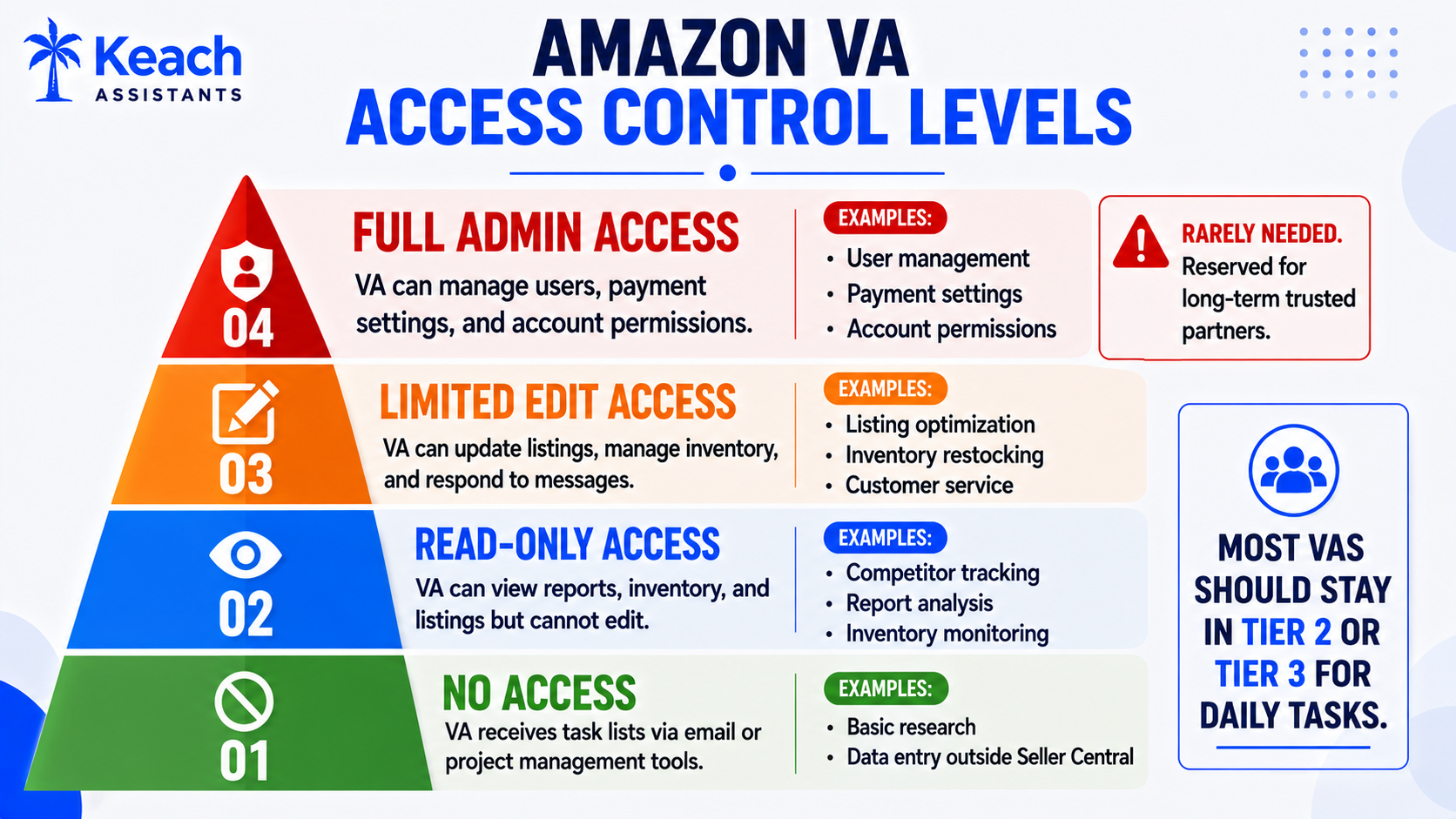
A signed agreement also protects you. It should outline confidentiality, data usage, and what happens if the relationship ends. Professional VAs expect this. It shows you are serious about protecting your business.
Onboarding Checklist for Amazon VA
A structured onboarding process sets everyone up for success. Use this onboarding checklist for Amazon VA to avoid missing critical steps.
- Create a separate user account in Seller Central.
- Assign appropriate permission levels.
- Share product list and brand guidelines.
- Provide access to necessary tools only.
- Set up a communication channel.
- Define weekly reporting expectations.
- Review security protocols together.
- Establish a trial period with clear goals.
This checklist transforms a chaotic handoff into a smooth transition. Both parties know what to expect.
The Role of Brand Registry
If you have Brand Registry, the VA may need access to manage it. This resource explains whether you really need Amazon Brand Registry and who sets it up for you.
Competitor Tracking and Market Research
Once the VA has read access, they can start tracking competitors. This guide shows how a VA tracks your Amazon competitors so you do not have to.
Inventory Management Responsibilities
Inventory is a common area for VA support. This blog explains how an Amazon VA keeps your FBA stock from running out or piling up.
Keyword Research and Listing Optimization
A VA can also handle keyword research. This breakdown shows how Amazon VAs actually do keyword research and why it is not the same as Google.
Handling Account Issues
If your account faces suspension, the VA may need to help. Here is a look at how a virtual assistant can help with Amazon account suspension.
Building Trust Over Time
Trust is earned, not given. The first week is a trial. You watch how the VA communicates. You review their work. You check for errors. If they perform well, you expand access. This gradual approach minimizes risk. It also gives the VA time to learn your business. Rushing the process benefits no one.
Conclusion
Knowing what to share with an Amazon virtual assistant on day one protects your business. Start with limited access. Use Amazon’s permission levels. Build trust through performance. Keach Virtual Assistant understands these concerns. We work within your comfort zone while delivering real results. The right partnership makes your business stronger, not more vulnerable.
Ready to Onboard Your VA the Right Way?
A structured process protects your business.
FAQs
What access does an Amazon VA need on day one?
A VA needs read-only access to your Seller Central account initially. This lets them view listings, inventory, and reports without making changes. You can expand permissions as trust builds.
Why should I create a separate user account for my VA?
A separate user account protects your main login credentials. You control permissions and can revoke access instantly if needed. It also creates an audit trail of actions taken by the VA.
Under what circumstances do I provide full admin access to my VA?
Full admin access is not always required. In most cases, minimal privileges will suffice. Full admin access should be considered only after months of reliable work and a good working relationship.
What must go into the VA onboarding checklist?
The onboarding checklist must include creation of a user account, permissions, product lists, brand guidelines, communication, and reporting. A trial period and defined objectives are also recommended.
How do I ensure security of my Amazon account in case of collaboration with a VA?
Make use of the user permission feature in Amazon. Make a confidentiality agreement. Do not ever give away your primary password or any banking details. Gradual escalation of access rights can be done based on performance.