Amazon again updated its terms, and once again, most of the sellers missed out on this information. Shorter titles, stricter character requirements, and one new field that many either ignored completely or stuffed with useless keywords were introduced. Those sellers who knew the real purpose of this field saw their click-through rates go up as others were confused.
The field is item highlights. It doesn’t get the attention that A+ content or ad campaigns get in seller forums. But used correctly, it does something quiet and powerful. It puts the most important details about your product right where shoppers look first.
This isn’t about gaming the system. It’s about understanding what Amazon is asking for now, and having someone on your team who can execute it consistently across every SKU.
What Amazon’s New Title Rules Actually Changed
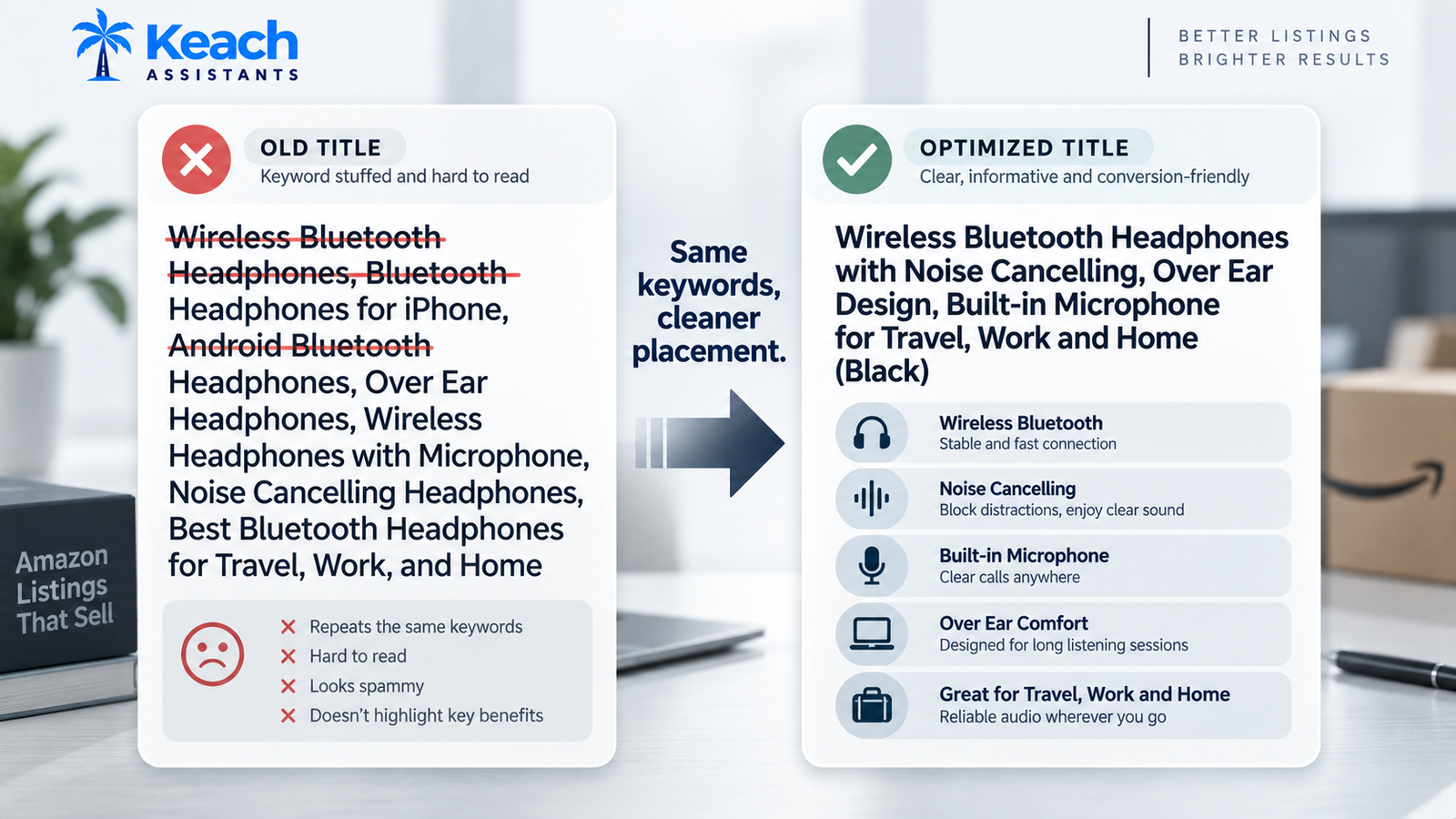
Amazon’s updated title policy pushed sellers toward shorter, cleaner titles. No more keyword stuffing. No more repeating the same phrase three times hoping the algorithm notices. No promotional language either, which caught a lot of people off guard because phrases like “Best Seller” and “Free Shipping” had been sitting in titles for years.
The logic behind this is simple. Amazon wants titles that read like product names, not ad copy. Shoppers scan, and a title crammed with keywords slows them down. A clear title plus a separate highlights field gives shoppers the details without the clutter.
The catch is that many sellers just moved their old stuffed titles into the new fields. That’s the wrong move. Item highlights aren’t a dumping ground for keywords. It’s a structured space for the five or six facts that actually help someone decide whether to buy.
From Keyword Stuffing to Clear Conversion
How to Use Amazon Item Highlights Field Without Losing Visibility
Learning how to use the Amazon item highlights field properly comes down to one principle. Put the decision-making details there, not the search terms.
Think about what a shopper needs to know in the first three seconds. Size, material, compatibility, quantity, key feature. Those belong in highlights. Keywords belong in the backend search terms and in the natural flow of the title.
A few practical rules that hold up across categories:
- Keep each highlight short and factual, roughly three to six words.
- Lead with the detail that separates your product from the closest competitor.
- Avoid repeating words already prominent in the title.
- Skip promotional language and all-caps entirely.
- Update highlights when the product changes, not once and forgotten.
Get this right across your catalog, and you’ll improve Amazon CTR with item highlights almost immediately, because shoppers finally see the answers they were scrolling for.
Tired of Guessing What Amazon Wants?
Capable VAs handle title updates and highlight fields the compliant way
Why This Work Needs a Specialist, Not an Intern
Updating one listing is easy. Updating four hundred of them correctly, across categories with different rules, is a different job entirely. That’s usually when sellers start looking for help.
If you hire a VA to update Amazon listing titles without clear guidelines, you’ll get exactly what you paid for. Rushed edits and flattened performance. The good ones understand Amazon’s style guide, know which categories allow what, and can tell the difference between a keyword that helps and one that triggers a flag.
Many sellers choose an Amazon-compliant title optimization service because the stakes are high. A single suppressed listing during peak season costs more than the service does. A good Amazon listing services partner will also flag listings that look fine on the surface but are quietly underperforming, which is where most of the lost revenue hides.
The Compliance Layer Nobody Talks About Until It Breaks
Here’s where things get technical. Title and highlight changes don’t happen in a vacuum. They interact with flat files, category templates, and Amazon’s automated compliance checks.
A wrong character in a bulk upload can wipe out an entire variation family. A mismatch between the title and the item highlights can trigger a review. And if you’ve ever uploaded a flat file only to watch every listing go inactive, you already know how painful that gets.
Amazon listing services teams deal with this constantly. They know the difference between a suppression that needs a support ticket and one that just needs the attribute fixed. They also know how to spot the pattern behind recurring errors, which is often a template problem rather than an individual listing problem.
If you’re not sure whether your current setup is safe, it’s worth checking whether your Amazon listing is compliant before the next update cycle, because fixing suppressions after they happen takes far longer than preventing them.
Testing, A+ Content, and the AI Search Shift
Amazon’s search is changing. COSMO and Rufus are pushing the platform toward intent-based results, which means the way your listings are written matters more than it used to. Keyword matching still counts, but context and clarity are catching up fast.
This is where Amazon virtual assistants who understand how to rank for COSMO and Rufus AI search become genuinely valuable. They’re not just editing text. They’re structuring listings so Amazon’s models can understand what the product is for and who it’s for.
Testing fits into the same picture. Small changes to titles and highlights produce measurable differences in click-through rate, and running those tests properly takes discipline. Most sellers don’t have the time, which is why brands hire a virtual assistant to run Amazon A/B testing rather than squeezing it in between everything else.
The same specialist can also handle building and designing premium A+ content, which ties directly back to the highlight field. The story your highlights tell should match the story your A+ modules tell. When those two align, conversion usually follows.
What This Actually Does to Sales
Nobody doubles sales from a single field change. That’s not how it works.
What happens is subtler. Better titles and highlights lift click-through rate. Higher CTR improves how Amazon views your listing. Better placement brings more traffic. More traffic plus clearer product information lifts conversion. Stack those improvements across a catalog, and the compound effect looks like a doubling, even though no single change caused it. That’s the difference between hiring a freelancer for one-off edits and working with established Amazon listing services that maintain the whole catalog.
The seller who wins here isn’t the one chasing a hack. It’s the one who treats listings as a maintained asset instead of a one-time setup.
Conclusion: Clean Data Beats Clever Tricks
Amazon keeps tightening its rules, and every round rewards sellers who write for shoppers instead of algorithms. Item highlights are the clearest example yet. It asks for clarity, and it punishes clutter.
Keach Assistants exists for sellers who’d rather not learn every category template by trial and error. Whether you need one listing fixed or a full catalog rebuilt, the goal stays the same. Listings that read well, rank well, and stay compliant.
Still Editing Listings at Midnight?
Hand the titles and highlights to someone who does this daily.
FAQs
What is an Amazon Item Highlight?
It is a dedicated area where you can highlight various brief and factual pieces of information about your product. It is used by Amazon in order to provide buyers with quick answers concerning the size, materials, or other features of the product.
Do item highlights affect search ranking?
They influence ranking indirectly. Clear highlights improve click-through rate, and stronger engagement signals can help your listing perform better over time. They aren’t a direct ranking factor the way backend keywords are.
What would happen to me if my title violates Amazon’s policy?
The listing will be suppressed, taken off the search, or you will receive a compliance warning. To resolve the problem, you will need to change your title.
Can a virtual assistant handle bulk listing updates?
Yes. Experienced VAs work with flat files and category templates to update hundreds of listings at once. They also catch template errors before uploading, which prevents mass suppressions that can take days to reverse.