Starting an Etsy shop feels exciting. You imagine customers discovering your products. You picture sales rolling in. Then reality hits. Listings need to be created. Orders need processing. Messages need answering. The excitement quickly turns into overwhelm. Without organization, even a small shop becomes chaotic.
Start Your Etsy Journey the Right Way
Learn how to start an Etsy shop with systems that prevent chaos.
Step One: Set Up Your Etsy Seller Account
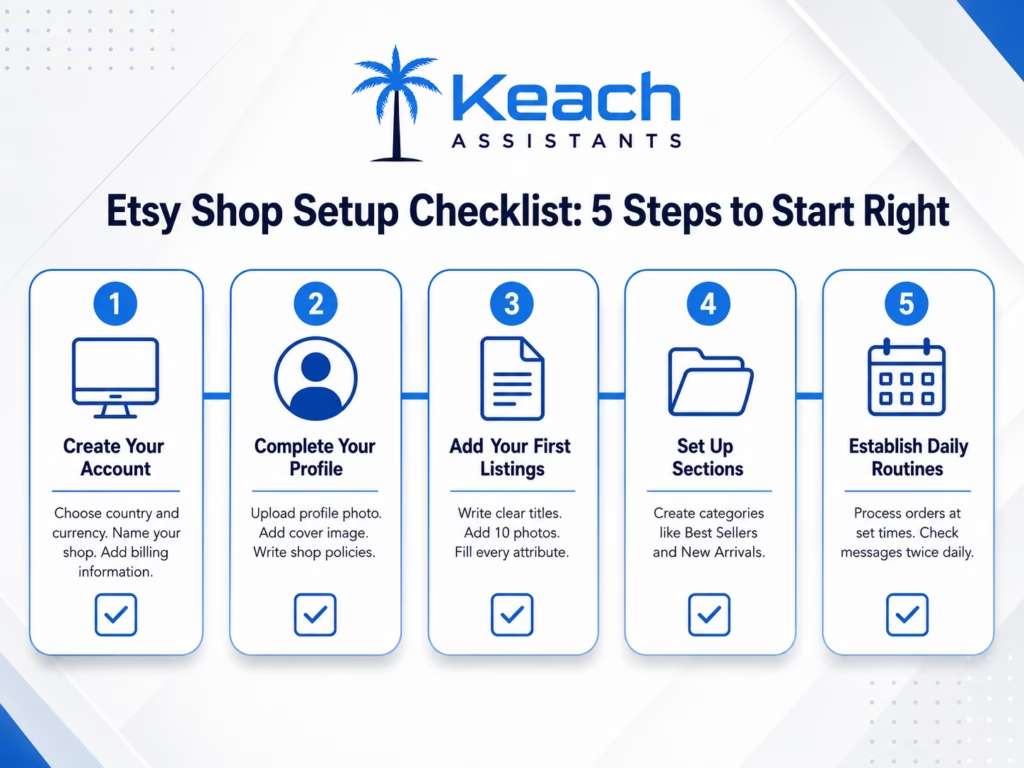
The technical setup takes only minutes. Visit Etsy.com and click “Sell on Etsy.” Choose your country and currency. Name your shop carefully because you cannot change it later. Set up billing information next. Etsy needs your bank details for payouts. They also need a credit card for listing fees.
Complete both sections before adding products. How to open an Etsy store properly means finishing every setup step. Verify your email address. Review your shop policies. Upload a profile photo and cover image. Complete shops rank higher in search.
Create Your First Listings with Organization in Mind
Start with one product category. Master its listing requirements first. Add more categories gradually as you build systems. Each listing needs clear sections. Write a title with important keywords early. Craft a description that answers customer questions.
Add all 10 photos from multiple angles. Fill every attribute, like size and color. Use consistent naming conventions for your listings. This organization helps later when you search your own shop. For example, name all candle listings as “Candle Lavender 8oz,” not “Beautiful Lavender Scented Candle.”
Love Selling on Etsy but Hate the Daily Organization?
At Keach Virtual Assistant, we provide Etsy virtual assistants who handle listings, orders, and customer messages. They create optimized listings. They process orders daily. They respond to customer questions. You focus on making products.
Organize Your Listings for Easy Management
Etsy offers sections to categorize your products. Use them. Create sections like “Best Sellers,” “New Arrivals,” and “Under $25.” Sections help customers browse and help you stay organized. Renew listings strategically. Etsy favors recently updated listings.
Rotate through your catalog each week. Renew a few listings daily rather than all at once. Track your inventory levels. Mark items as out of stock when they sell. Update quantities immediately after each order. This prevents selling products you no longer have.
Process Orders Without Missing Anything
Set up a daily order processing routine. Check your orders each morning. Print packing slips or shipping labels. Pack items carefully. Ship within your stated processing time. Use Etsy’s shipping labels for convenience. The system fills in buyer addresses automatically. You receive discounted postage rates. Tracking numbers are uploaded to Etsy instantly. Communicate with buyers after shipping. Send a quick note confirming their order is on the way. Include the tracking number. This small touch prevents “Where is my order?” messages later.
Stop Drowning in Orders and Messages
Start an Etsy shop with systems that keep everything organized.
Manage Customer Messages Efficiently
Check your Etsy messages at set times each day. Morning and afternoon work well for most sellers. Responding within 24 hours maintains good customer service. Create saved replies for common questions.
“What are your shipping times?” and “Do you offer gift wrapping?” both deserve templates. Write answers once. Use them repeatedly. Flag urgent messages for immediate response. Angry customers or shipping problems need faster attention. Address these before routine questions.
Scale with Help When Ready
Your shop will grow. More products mean more listings to manage. More orders mean more processing time. More customers mean more messages. Consider hiring an Etsy virtual assistant when daily tasks exceed two hours. A VA handles listing creation, order processing, and customer messages. You focus on product development and growth strategy.
Before You Go: Find Scalable Shop Ideas
If you need product inspiration, check out our related guide. It covers Etsy shop ideas for sellers looking to build a scalable online business.
Ready to Start an Etsy Shop That Runs Smoothly?
Let an Etsy virtual assistant handle daily operations from day one.
Wrap Up
How to start an Etsy shop involves more than creating an account. Proper Etsy shop setup includes complete billing information, thoughtful policies, and organized listing structures. Process orders daily using Etsy’s shipping labels. Manage messages efficiently with saved replies and set response times.
The key to a smooth-running shop is systems. Consistent listing names help you find products later. Daily order routines prevent shipping delays. Saved replies save hours of typing. Start organized and scale successfully.
At Keach Virtual Assistant, we provide Etsy virtual assistants who handle the daily operations. Listing creation, order processing, and customer messages. You focus on products and growth. Let us help you build a shop that runs smoothly.
Frequently Asked Questions
How do I start an Etsy shop for the first time?
Visit Etsy.com and click “Sell on Etsy.” Choose your country and currency. Name your shop. Set up billing and payout information. Complete your profile with a photo and policies. Then start adding your first listings. The entire setup process takes less than an hour.
What information do I need for Etsy seller account setup?
You need your bank account details for payouts. You need a credit card for listing fees. You need a shop name that reflects your brand. You need shop policies including returns, exchanges, and shipping timelines. Have this information ready before starting.
How can I organize my Etsy listings effectively?
Use Etsy sections to categorize your products. Create sections like “Best Sellers” and “New Arrivals.” Use consistent naming conventions for similar products. Renew listings strategically each week. Track inventory levels and update quantities after each sale.
What is the best way to process Etsy orders daily?
Create a daily order processing routine. Check orders each morning. Print packing slips or shipping labels. Use Etsy’s shipping labels for discounted rates. Pack and ship within your stated processing time. Send buyers a confirmation message with tracking information.
How can an Etsy virtual assistant help my shop?
An Etsy virtual assistant creates and optimizes your listings. They process orders and update inventory. They respond to customer messages using saved replies. They handle daily operations while you focus on product creation and business growth. A VA typically pays for itself through saved time and increased sales.