Handing over the keys to an online store is a moment of trust that makes a lot of business owners nervous. The login credentials that protect customer data and payment information and years of hard work are suddenly in someone else’s hands. That nervousness is healthy. It means the stakes are understood.
The good news is that protecting store access does not require a degree in cybersecurity. A few straightforward practices and the right tools keep sensitive information secure while still giving a virtual assistant everything they need to do their job. Trust and security can coexist without either one getting sacrificed.
How To Safely Share Store Credentials With VA And What Best Practices Look Like
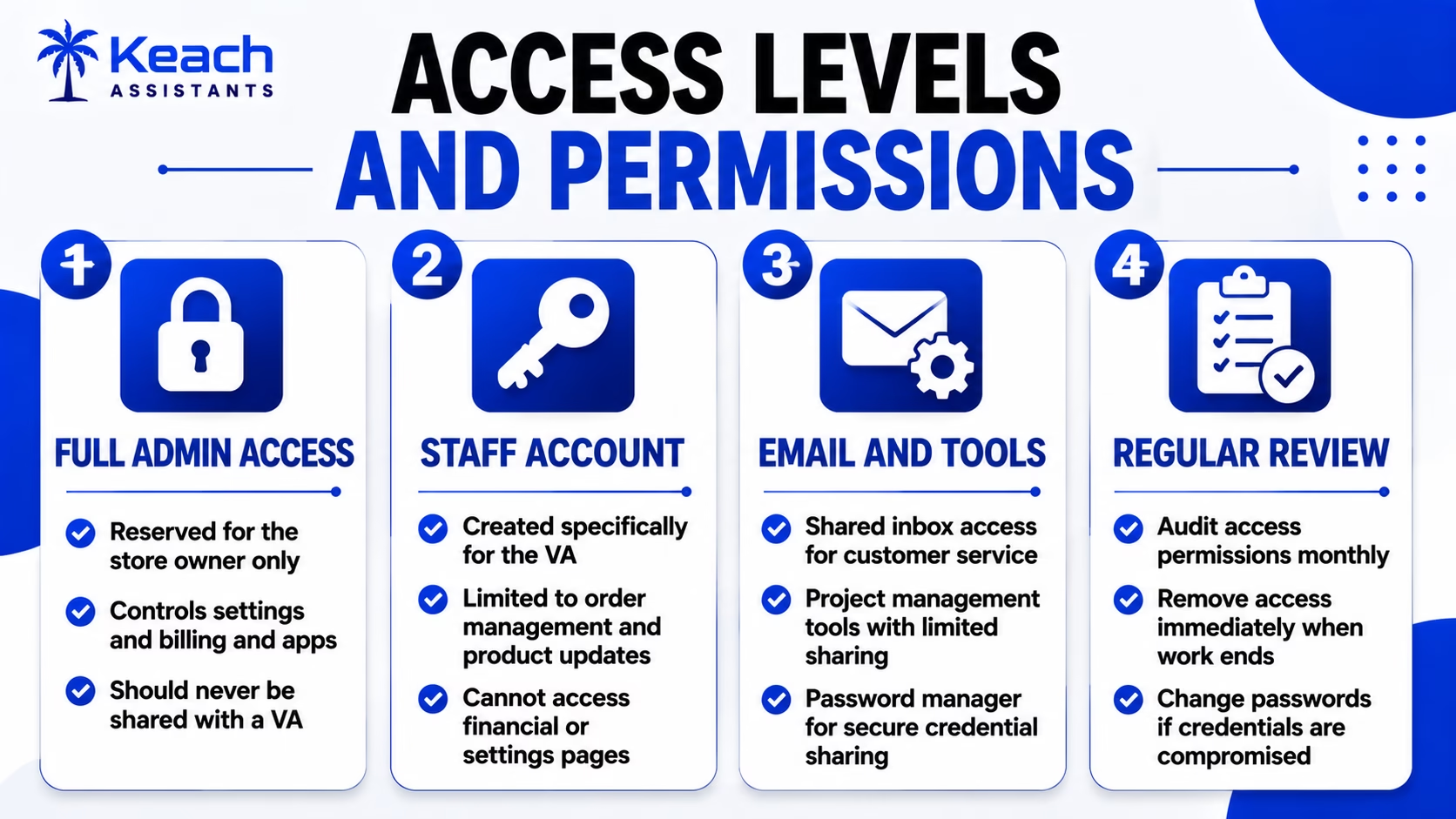
The question of how to safely share store credentials with a VA starts with the platform itself. Shopify and WooCommerce and most major e-commerce platforms allow store owners to create staff accounts with limited permissions. A VA who only needs to process orders does not need access to financial reports or the ability to install apps.
A good e-commerce VA will expect these limitations. It is a sign of professionalism when a store owner restricts access to only what is necessary.
For a look at what VAs handle once they have access, this guide on e-commerce VA daily tasks covers the full scope of the role.
Access Levels and Permissions Guide
Confidentiality Agreement for E-Commerce VA and Why It Matters
A solid confidentiality agreement for e-commerce VA puts the expectations in writing before any work begins. The agreement covers what information the VA can access and how that information can be used and what happens to it when the working relationship ends.
A professional e-commerce VA will have no problem signing a confidentiality agreement. It protects both parties by making the rules clear from day one.
For help getting a VA started the right way, this guide on training an e-commerce VA covers the onboarding process from the first login to full independence.
Protecting Store Access With Virtual Assistants And What Tools Help
The practice of protecting store access with virtual assistants is made easier with the right tools. Password managers let store owners share login credentials without ever revealing the actual password. LastPass and 1Password both allow secure sharing with the ability to revoke access instantly.
Two-factor authentication adds another layer of security. Even if credentials are compromised, the account stays protected. An e-commerce VA should be set up with their own login and their own two-factor method. Shared accounts make it impossible to track who did what.
Protect Your Store While Getting the Help You Need!
Keach Assistant follows strict security protocols to keep your business safe.
Best E-Commerce Security Practices For Online Store Administration And What To Implement
The best e-commerce security practices for online store administration start with the principle of least privilege. Every account should have the minimum permissions needed to do the job. A VA who processes orders does not need access to the store’s financial settings.
Regular audits keep security tight. Reviewing who has access and what they can do prevents old accounts from lingering after a working relationship ends. An e-commerce VA who understands security is a partner in protecting the business.
For a look at how VAs handle busy periods securely, this guide on e-commerce VA support during peak season covers the workflows that keep things running smoothly.
Security That Builds Trust Instead of Fear
Handing over store access does not have to feel like a leap of faith. The right permissions, the right tools, and a clear agreement in writing make it a calculated business decision. A VA who respects security protocols is a VA who respects the business.
We work within the security frameworks that store owners establish. Limited access, signed agreements, and a commitment to protecting what has been built. The store stays secure, and the work still gets done.
Get a VA Who Takes Security Seriously!
Let Keach match you with an e-commerce virtual assistant who respects your business.
FAQs
How do I safely share store credentials with a VA?
Create a staff account with limited permissions. Use a password manager for secure sharing. Enable two-factor authentication. Never share full admin credentials with anyone.
What should a confidentiality agreement for an e-commerce VA include?
What information the VA can access and how it can be used. What happens to data when the relationship ends. Clear consequences for breaches of confidentiality.
How can I secure access to the store when using a VA?
Provide staff members with accounts that have restricted rights and two-factor authentication enabled. Audit access and terminate it right away upon completion of work.
Which are the most secure practices for e-commerce administration?
Use the concept of least privilege, password managers, and two-factor authentication. Conduct regular audits of accounts and terminate any unneeded access.
Is it possible for a VA to work efficiently under limited account permissions?
Yes, it is. And professional VAs should expect such restrictions. Accounts for staff members give full access to everything necessary to process orders and communicate with customers.