You finally hired a social media VA. Congratulations. Now comes the part that determines whether this works or fails the actual working relationship.
Many business owners make a critical mistake. They hire someone, hand over passwords, and expect magic. Then they get frustrated when things are not perfect. The problem is not the VA. The problem is the lack of systems.
Working with a social media virtual assistants requires structure. Clear expectations. Good communication. Regular feedback. Without these, even the best VA will struggle.
This guide walks you through exactly how to work with a social media VA. From the first day to ongoing management. You will learn how to onboard a virtual assistant properly, set KPIs that actually matter, and build a workflow that runs smoothly.
Set Your VA Up for Success From Day One
A great hire needs great systems.
Before Day One: Prepare Your Systems
The work starts before your VA begins. Preparation determines success.
Document Your Processes
Write down how you want things done. Do not assume your social media virtual assistants will figure it out. Create simple guides for recurring tasks. How to write a product caption. What tone to use in customer responses?
Which hashtags to include. How to schedule posts in your tool. What to do when a customer complains. This documentation does not need to be perfect. Start with bullet points. Add screenshots. Update as you go. The act of writing things down forces clarity.
Gather Your Assets
Your VA needs access to things. Brand guidelines. Logo files. Approved photos. Response templates. Hashtag lists. Content calendars.
Gather these before day one. Put them in a shared folder like Google Drive or Dropbox. Your VA should not waste time hunting for basic materials.
Set Up Access
Create accounts or share passwords for the tools your VA needs. Scheduling tools like Later or Buffer. Social media accounts themselves. Canva for graphics. Google Analytics for tracking.
Use a password manager like LastPass or 1Password to share credentials securely. Avoid sending passwords via email or text.
How To Onboard A Virtual Assistant Properly
Onboarding sets the tone for the entire relationship. Do it well.
Start With a Welcome Call
Schedule a video call for the first day. Spend 30 to 60 minutes walking through everything. Introduce yourself and your brand. Share your vision for social media. Explain their role and responsibilities.
Show them where to find documentation and assets. Walk through your tools together. Answer their questions. This personal touch builds trust and reduces anxiety on both sides.
Assign Small Tasks First
Do not dump everything on day one. Start small. Give them a few simple, well-defined tasks. Schedule three posts for next week. Respond to the five oldest customer comments. Create one graphic for an upcoming promotion.
These small wins build confidence. They also let you see their work quality before trusting them with bigger responsibilities.
Set a Trial Period
Use the first two to four weeks as a trial. Frame it that way from the start. “We are both trying this out. Let us see how it feels.” During this period, review their work closely. Give specific feedback. Adjust processes as needed. If it is not working, part ways before you are deeply invested.
Onboarding Done Right Saves Months of Frustration
Let us help you create an onboarding plan that works for your brand.
Setting KPIs For Social Media Virtual Assistants Success
How do you know if your VA is doing a good job? You need measurements.
Output-Based KPIs
These measure what your VA produces. Number of posts scheduled per week. Response time to customer comments. Number of customer questions answered. Number of graphics created. Percentage of scheduled posts published on time.
Output KPIs are easy to track. They tell you if your VA is completing assigned work.
Quality-Based KPIs
Output alone is not enough. Quality matters too. Engagement rate on posts your VA creates. Customer satisfaction with responses. Accuracy of scheduled posts (no typos or broken links). Consistency with brand voice.
Quality KPIs require more judgment. Review a sample of work each week. Rate it against your standards.
Impact-Based KPIs
These measure business results. Growth in followers. Increase in engagement. Traffic from social media to your website. Conversions or sales attributed to social media.
Impact KPIs are the most important. But they also depend on factors outside your VA’s control. Your product quality. Your pricing. Your overall marketing. Use impact KPIs as directional signals, not strict targets.
Here is a simple table to help you choose the right KPIs for your situation.
| VA Experience Level | Focus On | Example KPIs |
|---|---|---|
| First 30 Days | Output and learning | Posts scheduled, tasks completed, questions asked |
| 1 to 3 Months | Output and quality | Response time, engagement rate, and accuracy score |
| 3+ Months | Quality and impact | Follower growth, traffic from social, conversions |
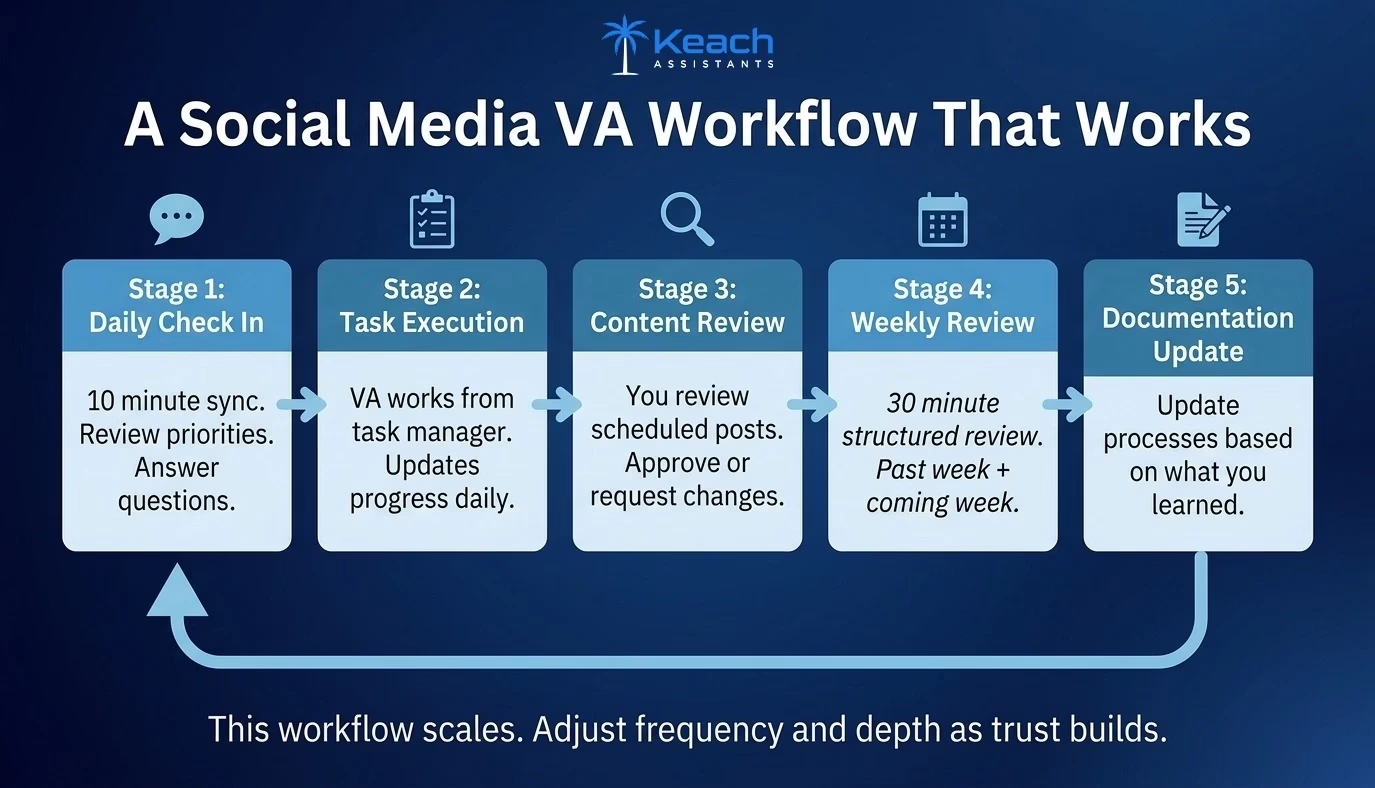
Building A Social Media VA Workflow That Works
A good workflow makes working together feel easy. A bad workflow creates confusion and missed tasks.
Daily Check Ins
For the first few weeks, check in daily. A 10-minute call or a Slack message. Review what they worked on. Answer questions. Clarify priorities. As trust builds, reduce frequency. Weekly check-ins are enough for most established relationships.
Task Management System
Use a tool to track tasks. Asana, Trello, Monday, or even a shared Google Sheet. Create columns for To Do, In Progress, Needs Review, and Done. Your VA moves tasks through the system. You review when needed. Nothing falls through the cracks.
Content Calendar
A shared content calendar is essential. Google Calendar, Airtable, or your scheduling tool’s calendar view. Your VA populates it with planned posts. You review and approve. This calendar becomes the single source of truth. No more “did you post that thing we discussed?”
Weekly Review
Set aside 30 minutes each week for a structured review. Look at the past week’s work. What went well? What could improve? Look at the coming week. What are the priorities? What does your VA need from you? Document key decisions from these reviews. Over time, they become your process documentation.
Create a Workflow That Works for Both of You
Keach Virtual Assistants are trained to adapt to your systems.
Communication Best Practices
Clear communication prevents most problems.
Be Specific
Avoid vague instructions. “Make our social media better” is not helpful. “Write three posts highlighting our new summer collection using the attached photos” is specific.
Use Examples
Show rather than tell. “Write captions like this example” is more effective than “write engaging captions.”
Give Balanced Feedback
Point out what is working well, not just what needs fixing. Positive feedback reinforces good habits.
Respect Their Time
Batch your questions and requests. Avoid interrupting with small things throughout the day. Your VA needs focused time to do their best work.
Trust but Verify
Check their work regularly, especially in the beginning. But avoid micromanaging. Give them room to own their responsibilities.
Common Problems And Solutions
Even good relationships hit rough patches. Here is how to handle common issues.
Problem: Your VA is missing deadlines. Solution: Check if deadlines were clear. Check if they have too much work. Check if they need better tools. Adjust accordingly.
Problem: The work quality is inconsistent. Solution: Review your documentation. Is it clear? Provide specific examples of good work. Set up a review process before publishing.
Problem: Communication feels off. Solution: Schedule regular check-ins. Clarify preferred communication channels. Ask your VA how they prefer to receive feedback.
Problem: You feel like you are still doing everything. Solution: Review your task list. Are you holding onto tasks you could delegate? Be honest about your own reluctance to let go.
Wrap Up
Working with social media virtual assistants is a partnership. Your success depends on clear systems, good communication, and mutual trust. How to onboard a virtual assistant properly sets the foundation. Setting KPIs for social media VA work gives you both clear targets. A thoughtful social media VA workflow makes daily collaboration smooth.
The best VA in the world will struggle without structure. The most organized business owner still needs a skilled partner. When both elements come together, the relationship transforms your business.
At Keach Virtual Assistant, we provide skilled social media VAs who understand how to work within your systems. We also help you build the onboarding and workflow processes that lead to long-term success. Whether you are hiring your first VA or your fifth, we are here to help you get it right.
Frequently Asked Questions
What is the best way to work with a social media VA for the first time?
Start with a structured onboarding process. Document your processes before they start. Begin with small, well-defined tasks during a trial period. Use a task management system to track work. Have daily check-ins initially, then reduce to weekly as trust builds. Clear communication and specific feedback are essential.
How to onboard a virtual assistant who has never worked in my industry?
Provide industry-specific training materials. Share examples of competitors or brands you admire. Create a glossary of industry terms. Pair them with someone knowledgeable for the first few weeks. Be patient as they learn. Focus their initial tasks on areas where industry knowledge matters less, like scheduling or basic engagement.
What KPIs for social media VA should I track in the first month?
In the first month, focus on output and learning KPIs. Number of tasks completed. Posts scheduled on time. Questions were asked about processes. Completion of onboarding materials. Do not focus on engagement or growth metrics yet. Those take time to develop. Give your VA room to learn before judging their impact.
How do I build a social media VA workflow that works across time zones?
Use asynchronous communication tools like Slack or email rather than requiring real-time calls. Set clear expectations about response times. Use a shared task manager where your VA can update progress without waiting for you. Schedule one overlapping hour per day or week for live questions. Document everything so your VA can work independently.
What should I do if my social media VA relationship is not working?
First, diagnose the problem. Is it skills, communication, or systems? Provide specific feedback and give them a chance to improve. Adjust your processes if needed. If things do not improve after two to four weeks, part ways professionally. A bad fit hurts both of you. Most services offer replacement options if the first match does not work.