Imagine this. You have finally hired a social media virtual assistant services to help with your brand’s online presence. You are excited about the time you will save. But then reality sets in. How do they actually manage posting across Instagram, Facebook, TikTok, and LinkedIn without logging in and out of accounts all day? How do you review content before it goes live? How do you keep everything organized?
The answer lies in good tools. The right scheduling platform transforms chaotic social media management into a smooth, efficient process. It allows your VA to plan content weeks, collaborate with you on approvals, and post at optimal times without being glued to a screen.
But with so many options available, choosing the right one can feel overwhelming. This guide walks you through the best Social Media Scheduling Tools specifically for social media virtual assistants and the brands they support. Whether you are a VA looking to streamline your workflow or a business owner wanting to understand which tools your assistant should use, this will help.
Your VA Needs the Right Tools to Succeed
Great virtual assistants use great software.
What Makes A Scheduling Tool Great For Virtual Assistants
Not every scheduling tool is built for the unique needs of a VA who manages multiple clients or accounts. Before diving into specific platforms, it helps to understand what features actually matter.
First, multi-account management is essential. A Social Media Virtual Assistant might handle your Instagram, your Facebook page, and your LinkedIn profile all within the same tool. Switching between native apps is slow and error-prone. A good scheduling tool keeps everything in one dashboard.
Second, approval workflows matter if you want to review content before it posts. Some tools allow you to preview posts and give feedback without logging into your VA’s account. This keeps you in control while saving you from doing the actual scheduling work.
Third, analytics help measure what is working. The best tools show engagement data right alongside your scheduled content. This allows your VA to refine strategy based on real results, not guesses.
Finally, team collaboration tools make the whole process smoother. Commenting on drafts, assigning tasks, and sharing content libraries all reduce back-and-forth emails.
Top Scheduling Tools Compared
Here is a detailed look at the leading platforms. Each has strengths depending on your needs, budget, and preferred platforms.
Later
Later started as an Instagram first tool but has grown significantly. It now supports Facebook, TikTok, Pinterest, LinkedIn, and Twitter. The visual content calendar is its standout feature. You drag and drop photos into a grid, seeing exactly how your feed will look before anything posts.
For Social Media Content Scheduling, Later excels at visual planning. It also includes Linkin.bio, a tool that turns your Instagram posts into clickable shopping links. This is especially valuable for eCommerce brands.
Pricing begins with a free plan for basic needs, though that only supports one user per social set. Paid plans start around $25 per month and include team collaboration tools like draft sharing and approval workflows.
Buffer
Buffer is known for simplicity. Unlike some tools that feel bloated with features, Buffer does one thing well: scheduling posts across multiple platforms. The interface is clean and straightforward. You compose your post, choose your platforms, pick a time, and move on.
For a Social Media Virtual Assistant managing straightforward content calendars without complex visual planning, Buffer is a solid choice. It supports Instagram, Facebook, TikTok, LinkedIn, and Twitter.
Buffer’s free plan allows up to three channels with limited scheduling. Paid plans start at $6 per channel per month, making it affordable for smaller brands. Team collaboration features are available on higher tiers, allowing clients to review and approve content.
Hootsuite
Hootsuite is one of the oldest and most feature rich Best Social Media Management Tools on the market. It supports nearly every platform and offers deep analytics, social listening, and team assignment features.
Where Hootsuite shines is for agencies or VAs managing multiple client accounts. The dashboard allows you to switch between clients instantly. You can assign tasks to team members, schedule posts in bulk, and generate detailed reports.
The complexity is also its downside. New users often find Hootsuite overwhelming. Pricing is higher, too, starting around $99 per month for professional features. But for serious Social Media Automation Tools needs across many accounts, it is hard to beat.
Planoly
Planoly is another visual-first tool similar to Later but with a stronger focus on Instagram and Pinterest. Its grid planner is excellent for brands that care deeply about aesthetic consistency. You can drag, drop, and rearrange posts until your feed looks perfect.
Planoly also includes user-generated content features, allowing you to search for and repost customer photos. This builds community while filling your content calendar.
Pricing starts with a free plan for one account. Paid plans begin around $15 per month and include team collaboration tools for approval workflows.
Trello And Asana For Content Planning
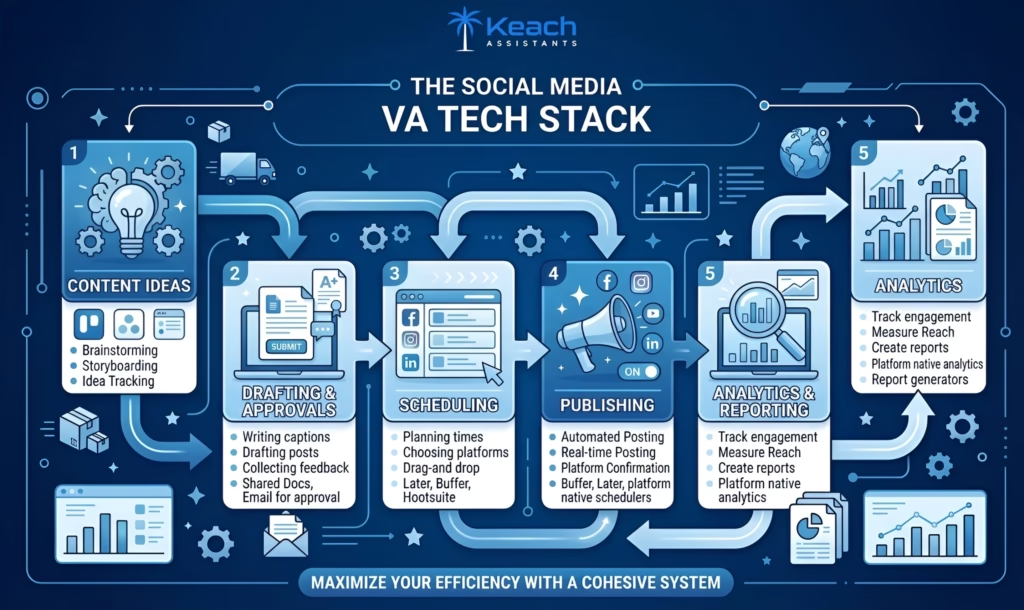
While not traditional scheduling tools, Trello and Asana deserve mention as Content Planning Tools. Many VAs use these platforms to brainstorm ideas, draft captions, and get client approval before moving content into a scheduler.
A common workflow looks like this. The VA creates cards in Trello for each post idea, including the image, caption draft, and planned date. The client reviews and comments. Once approved, the VA moves the content into Buffer or Later for actual scheduling.
This two step process separates planning from publishing, which many brands prefer. It also creates a clear paper trail of approvals.
A Quick Comparison Table
To help you decide, here is a side-by-side look at key features.
| Tool | Best For | Starting Price | Team Collaboration | Visual Planning | Platforms Supported |
|---|---|---|---|---|---|
| Later | Visual Instagram planning | Free / $25 per month | Yes (paid plans) | Excellent | Instagram, Facebook, TikTok, Pinterest, LinkedIn, Twitter |
| Buffer | Simple, straightforward scheduling | Free / $6 per channel per month | Yes (paid plans) | Limited | Instagram, Facebook, TikTok, LinkedIn, Twitter |
| Hootsuite | Multi-client management | $99 per month | Yes | Moderate | Nearly all major platforms |
| Planoly | Aesthetic grid planning | Free / $15 per month | Yes (paid plans) | Excellent | Instagram, Pinterest, Facebook |
| Trello / Asana | Content planning and approvals | Free/low cost | Yes | Via power-ups | N/A (planning only) |
This table shows that the best choice depends on your priorities. Visual brands tend to use Later or Planoly. Simplicity lovers choose Buffer. Power users managing many accounts prefer Hootsuite.
Not Sure Which Tool Fits Your Brand?
Your Keach Virtual Assistant comes trained on multiple platforms.
Features That Improve Team Collaboration
One of the biggest challenges when delegating social media is staying aligned. You want to trust your VA, but you also want to see what is going out before it posts. The right tools solve this.
Team collaboration tools within scheduling platforms allow you to review drafts, leave comments, and approve or reject content without ever logging into your VA’s account. Some tools even require approval before posts go live. This gives you complete control while saving you from manual scheduling.
Look for features like shared content libraries, where your VA can save approved images and captions for reuse. Comment threads on individual posts allow for specific feedback. Activity logs show exactly who made which changes.
These features build trust over time. As your VA demonstrates reliability, you may choose to reduce oversight. But having the option for review gives peace of mind, especially in the beginning.
How Automation Saves Time Without Losing Authenticity
There is a common fear about Social Media Automation Tools. People worry that automation makes brands feel robotic or impersonal. Used correctly, the opposite is true.
Automation handles repetitive work. Scheduling posts in advance, cross-posting the same content to multiple platforms, and publishing at optimal times. These tasks do not require human creativity. Automating them frees your VA to spend time on genuine engagement, responding to comments, and creating truly original content.
The key is balance. Use automation for predictable, routine work. Reserve human attention for conversations, community building, and real-time responses. A skilled VA knows exactly where to draw this line.
Conclusion
The right scheduling tool transforms how a Social Media Virtual Assistant works. Instead of scrambling to post each day manually, your VA plans content calmly in advance. Instead of confusion about approvals, clear workflows keep everyone aligned. Instead of guessing about performance, data guides strategy.
But tools alone are not enough. They need to be paired with a skilled professional who knows how to use them effectively. A great VA with mediocre tools will struggle. A mediocre VA with great tools will still underperform. The magic happens when a trained, experienced VA uses best-in-class software.
At Keach Virtual Assistant, we train our college graduate virtual assistants on the leading scheduling and management platforms. Whether your brand needs visual planning in Later, straightforward scheduling in Buffer, or advanced management in Hootsuite, we match you with a VA who already knows the tool. You get the combination of human expertise and technical capability that drives real results.
Ready to Hand Over Your Social Media Scheduling?
Keach Virtual Assistants are trained, vetted, and ready to use the best tools for your brand.
Frequently Asked Questions
What is the best social media scheduling tool for beginners?
Buffer is widely considered the most beginner-friendly option. Its interface is clean and uncluttered, making it easy to understand how scheduling works. Later is also approachable, especially for brands focused on visual platforms like Instagram. Both offer free plans, allowing you to test before committing.
Can multiple team members use the same scheduling tool?
Yes, most modern scheduling tools include team collaboration features. Later, Buffer and Hootsuite all allow you to add team members with different permission levels. You can grant your VA full scheduling access while keeping approval rights for yourself. Some tools even allow clients to review and approve content without a paid seat.
How do social media automation tools prevent posting errors?
Good tools include preview features that show exactly how your post will appear on each platform before it goes live. Many also offer bulk scheduling with error checking. The most important safeguard is a human review step. A careful VA always reviews scheduled content in the calendar view to catch mistakes before they publish.
Do I need separate content planning tools if I already use a scheduler?
Not necessarily, but many teams prefer separation. Using Trello or Asana for brainstorming and approvals keeps your scheduling tool clean for the final, ready to post content. This two-step workflow is especially helpful when multiple people contribute ideas or when clients want to review drafts without logging into the scheduler.
Which tools offer the best analytics for tracking performance?
Hootsuite offers the deepest analytics, including custom report building and social listening. Later and Buffer provide solid basic analytics showing engagement, reach, and best posting times. For most small to medium brands, the analytics within Later or Buffer are sufficient. Larger brands may need Hootsuite’s advanced features.